Showing posts with label errors. Show all posts

Monday, October 25, 2010

Cannot create a Search Service Application

Recently I’ve been building out a few SP2010 farms manually using PowerShell so I can control the naming of certain elements like databases, app pools, etc. However, I ran into a situation where I needed to delete my search service (in two separate farms) and start over. At first, I couldn’t cleanly delete the service app. Both the web and PowerShell interfaces would just hang. Some pieces would get removed, and others would not. So this post helped me forcefully remove the service itself.

http://social.technet.microsoft.com/Forums/en-US/sharepoint2010setup/thread/88f7998f-4a88-4928-ba59-e76d7f6afcdc

This didn’t quite solve my problem though. When I would go to recreate the search service application, PowerShell would hang. I could see that just about everything was finished, but the service app was showing a status of “Error”. The trace logs didn’t help, so I began to dig around in the configuration database. Lo and behold, I found another row in the Objects table that had the same name as what I was trying to use for my recreated search service. I still don’t quite know how this happened… So I made sure I had the proper GUID for the orphaned item, and I used the stsadm –o deleteconfigurationobject command to remove the duplicate. Almost immediately my PowerShell command finished executing and all was well.

Both farms that had this issue had different orphaned items. On one farm, the object for the old service application needed to be deleted. On another farm, the objects for the crawl store and property store databases were the offenders.

Friday, March 27, 2009

“User cannot be found” when managing site collection

As you have probably come to realize, “friendly” SharePoint errors can be frustrating, mainly because they’re always as vague as possible. So I came across a new one today while trying to select a site collection to manage from within Central Admin.

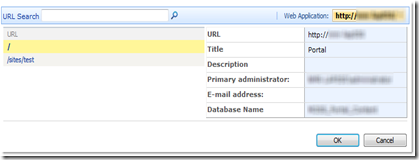
I’ll start off by pointing out that, at first glance, nothing was visibly wrong with the site collection itself (it was a personal site, by the way…not that it matters though). I could browse the root site, modify settings, add user permissions, etc. But whenever I would select it from the Site Collection List page (see Figure A), it would send me to an error page saying “User cannot be found.”

Figure A - Site Collection List
Figure A – Site Collection List

None of the other site collections listed were throwing this error. My first thought was that SharePoint couldn’t populate the data being shown in the details section of the list. The primary administrator is the only user shown there. This is not the first site collection administrator as you might think, but the site collection owner – the person that created the site.

So I jumped over to the settings page for the problem site. The list of site collection administrators was suspiciously blank. After adding a new user to the list, suddenly the missing one appeared as well. But any attempts to remove the phantom user complained that I can’t remove an owner from the list.

Now I know modifying SharePoint data directly is a big no-no, but it’s a great place to look to see what might be causing a problem like this. So that’s exactly what I did. As it turned out, the owner ID listed for the site collection in the Sites table was different than the ID listed for the same user in the UserData table. So at some point something must have happened to the user’s profile causing it to be recreated with a new ID, orphaning the original profile. Don’t ask me how such a thing might happen…

Anyway, fixing the problem was simply a matter of changing the primary owner. A quick call to stsadm made short work of it:

stsadm –o siteowner –url http://site –ownerlogin domain\username