Showing posts with label sharepoint. Show all posts

Monday, July 26, 2010

Changing Publishing Page Layouts in SharePoint 2010

I had a problem this morning with trying to change the page layout for a publishing page in SP2010. I’m building my own content types and layouts for my company’s public-facing site, but I don’t have the time to build everything from scratch, so I’m using the out-of-the-box site definition. So to make things work the way I want them to, I am changing each site after creation to use my custom page layouts.

My problem is that after configuring the content types on the Pages library and changing the available page layouts for the site, I still could not change the layout on a page that was checked out to me and in edit mode. As it turns out, the Page Layout button on the ribbon is sensitive to the approval state of the available layouts. If there is no published version of a layout, it is technically unavailable. If none of the available layouts have been published, the button is disabled altogether.

This behavior is different than in SP2007, so it thoroughly frustrated me. Hopefully this will be of some help to others.

Thursday, July 22, 2010

SharePoint 2010 Exams: A Much Needed Improvement

I recently took and passed the four SP2010 beta exams. Having also taken the four older exams, I must say that Microsoft seems to have gotten it right this time.

These newer tests now break out skill measurements into a TS and PRO level for each track – administrator or developer. The PRO exams are fairly tough, and they are focused on scenarios that require you to review user requirements and plan/design a solution accordingly. The older tests broke WSS and MOSS out into their own exams for each track, and sadly, the questions (especially on the admin exams) were not designed well enough to be a good measurement.

Now all we need are exams that target the SharePoint Designer skill sets. Maybe Microsoft has something in the works for the next version…

Monday, November 16, 2009

Office 2010 Beta 2 Released to MSDN

Microsoft released a slew of Office 2010 beta products to MSDN today:
  • SharePoint Server 2010 Enterprise
  • SharePoint Server 2010 for Internet Enterprise
  • SharePoint Foundation Server 2010
  • FAST Search Server for SharePoint 2010
  • Search Server Express 2010
  • Office Web Applications 2010
  • Project Server 2010
  • Office Professional Plus 2010
  • SharePoint Designer 2010
  • Project Professional 2010
  • Visio Premium 2010
  • Business Contact Manager 2010

You have no idea how excited I am to finally get to play with this stuff. I've been using the Office client since the tech preview, but the only exposure I've had to the SharePoint beta has been at this year's SharePoint conference.

I hope to have lots of stuff to post coming up soon.

Thursday, September 17, 2009

The SPD Workflow History List Conundrum

I have this project that I’m working on that requires a lot of SPD workflows. Some of them are legitimate workflows, while others do quick actions like sending notifications or updating fields. At some point I realized that the default history list that SPD attaches to all workflows is going to get large pretty quickly.

So being a clever guy, I proceeded to write a small utility that would let me create new history lists and associate them with my workflows. I was okay with losing some of the history that would be displayed with the workflow statuses. Boy, what a bad idea…

I had three problems:
1. I couldn’t change the history list for workflow instances that were currently running. This was annoying, but I figured I’d get a chance to do it at some point when the workflows completed.
2. Any changes to the workflows in SPD changed the history list association back to the default one. Also annoying, but I could deal with it.
3. It completely prevented workflows from running. Yeah, I saved the best one for last.

I’ve given up on making this work. I’ll gladly accept any ideas that someone has on the matter (besides creating and packaging the workflows in Visual Studio). My internet searches have been in vain.

Friday, April 17, 2009

Another acronym bites the dust

According to Redmond Channel Partner (http://rcpmag.com/news/article.aspx?editorialsid=10776), Microsoft is removing the word “Office” from the full name of its premium SharePoint product for the 2010 release. It will now simply be called Microsoft SharePoint Server 2010. This is nothing new for the software giant, as their product names typically change in some way with each major version.

So if MOSS is no more, and MSS is used by Search Server, what will we call SharePoint Server? I don’t know about you, but I’m going back to SPS - SharePoint Server. Come on…who’s with me?

Friday, March 27, 2009

“User cannot be found” when managing site collection

As you have probably come to realize, “friendly” SharePoint errors can be frustrating, mainly because they’re always as vague as possible. So I came across a new one today while trying to select a site collection to manage from within Central Admin.

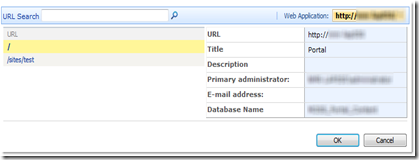
I’ll start off by pointing out that, at first glance, nothing was visibly wrong with the site collection itself (it was a personal site, by the way…not that it matters though). I could browse the root site, modify settings, add user permissions, etc. But whenever I would select it from the Site Collection List page (see Figure A), it would send me to an error page saying “User cannot be found.”

Figure A - Site Collection List
Figure A – Site Collection List

None of the other site collections listed were throwing this error. My first thought was that SharePoint couldn’t populate the data being shown in the details section of the list. The primary administrator is the only user shown there. This is not the first site collection administrator as you might think, but the site collection owner – the person that created the site.

So I jumped over to the settings page for the problem site. The list of site collection administrators was suspiciously blank. After adding a new user to the list, suddenly the missing one appeared as well. But any attempts to remove the phantom user complained that I can’t remove an owner from the list.

Now I know modifying SharePoint data directly is a big no-no, but it’s a great place to look to see what might be causing a problem like this. So that’s exactly what I did. As it turned out, the owner ID listed for the site collection in the Sites table was different than the ID listed for the same user in the UserData table. So at some point something must have happened to the user’s profile causing it to be recreated with a new ID, orphaning the original profile. Don’t ask me how such a thing might happen…

Anyway, fixing the problem was simply a matter of changing the primary owner. A quick call to stsadm made short work of it:

stsadm –o siteowner –url http://site –ownerlogin domain\username